Macros
A quick way to reuse SPL queries
Searching
- Where
keyis equal tovalue-key="value" - Where
obj: { property }is equal tovalue-obj.property="value" - Where
keycontainsvalue-key="*value*" - Where
keystarts withvalue-key="value*" - etc…
Ignore Results That Contain Field
NOT field=*
!= vs NOT
https://docs.splunk.com/Documentation/Splunk/8.2.3/Search/NOTexpressions
Both != field expression and NOT operator exclude events from your search, but produce different results
Example: status != 200
    Returns events where status field exists and value in field doesn’t equal 200
Example: NOT status = 200
    Returns events where status field exists and value in field doesn’t equal 200 – and all events where status field doesn’t exist
Does != and NOT ever yield the same results?
    Yes, if you know the field you’re evaluating always exists in the data you’re searching
    For example:
        index=web sourcetype=access_combined status!=200
        index=web sourcetype=access_combined NOT status=200 yields same results because status field always exists in access_combined sourcetype.
Gotta go fast
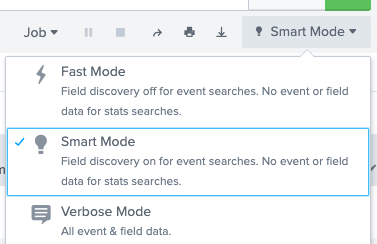
Splunk has a “Fast mode” which doesn’t emit field data - making the lookup and transmission times really short
Tables
| table field1, field2, field3, field4
If you want to put attributes of a key, you can rename those attributes so they are within the root level.| rename dataObj.* as * | table ...
Counting
| stats count by "data.event_simpleName"
Grouping
The by keyword groups entries by the value of a given key
Times
Epoch to String
| convert ctime(epoch)
01/05/2022 09:39:27.818794000
Duration
| eval stringSecs=strftime(interval, "%Mm %Ss %2Nms")
This only really works for intervals less than one hour.
strftimeuses your Splunk’s timezone setting, sostrftime(0, ...)would automatically add 10 hours in Australia (GMT+10)